

Hall Effect magnetic switches use a moving magnet to register how far a key has travelled. Inside the switch, a spring returns the stem after every keypress, and a sensor beneath the switch reads changes in the magnetic field. The sensor sits on the keyboard’s printed circuit board (PCB), so the electrical reading doesn’t require metal contacts to touch. A controller maps the reading to an estimated key position. Physical keycap fit alone doesn’t guarantee replacement-switch compatibility.

The Switch and the Sensor
A magnetic switch contains the parts that move under your finger, and the Hall sensor normally sits on the board below it. Pressing the key moves a magnet within the switch towards that stationary sensor. The sensor detects the changing field without waiting for two metal leaves to meet.
Hall Effect names the sensing principle rather than a particular switch shape or collection of keyboard features. People often use Hall Effect switches to describe the magnet-equipped unit, although the sensor is usually a separate component on the PCB.
Contactless sensing avoids electrical contact bounce and leaf wear, but the moving parts still affect friction and feel. With a suitable sensor and controller, the keyboard can track movement through a press instead of recognising only one fixed contact point.
How Key Travel Becomes a Signal
As a key travels, the changing field produces a measurement that the controller can interpret.
The Hall Effect
The Hall Effect occurs when current passes through a conductor exposed to a magnetic field at right angles to that current. Moving charge carriers gather on one side of the material and create a small voltage across it.
In a Hall sensor, the effect provides an underlying signal for detecting changes in the field. Sensor circuitry may process the signal before sending data to the keyboard controller, and the field’s direction affects the reading.
From keypress to position reading
During a press, the stem carries the magnet towards the sensor beneath that key. Each stage of travel changes the field measured at the sensor, allowing the controller to interpret the movement as an input:
-
Move the stem: Your finger pushes the keycap down and compresses the spring inside the switch.
-
Change the field: The approaching magnet changes the magnetic flux density measured at the sensor.
-
Read the signal: Sensor circuitry produces a changing voltage or a processed digital value.
-
Calculate position: The controller relates that value to key travel and checks the chosen thresholds.
-
Register the press: Firmware sends a keystroke when the estimated position crosses the actuation point.
Magnetic flux density describes the field at the sensor and is commonly expressed in tesla (T), though gauss (G) is also used. The controller infers position from a calibrated field reading rather than measuring travel directly inside the key.
Magnet orientation and the distance to the sensor both affect the usable signal. Changes to that distance, including differences in PCB construction or sensor placement, can alter readings at rest and at bottom-out.
How continuous position sensing works
A Hall Effect keyboard can use a sensor arrangement that provides a changing measurement as the magnet moves. Its electronics may represent the measurement internally as an analogue voltage or convert it into digital data. A suitable controller interprets those changing values as positions along the key’s travel, allowing firmware to respond at selected depths.
Inside a Magnetic Switch
The physical parts shape the typing feel, even though electrical sensing takes place without contact. A housing guides the stem, and the spring sets the force needed to move it. Magnet placement and polarity affect the signal available to the sensor beneath the switch.
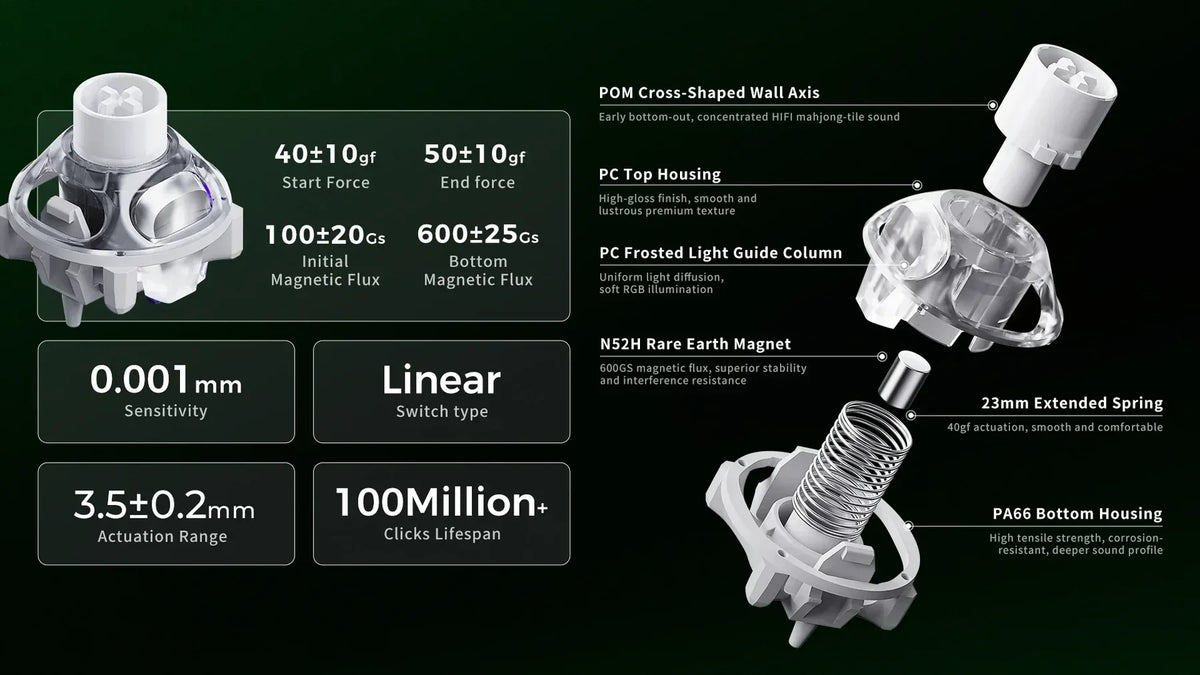
Many magnetic switches are linear, so they move without a deliberate tactile bump. Some use a polyoxymethylene (POM) stem with rails or a circular wall to manage wobble and friction.
The bottom housing forms part of the stop and can influence the sound and feel of a full press. An open upper structure can transmit more RGB light, and compatible cross-shaped stems can accept familiar keycaps.
Operating force and total travel describe different properties of a switch. A key may start moving at its specified operating force yet require more force near the end of travel. A listed distance such as 3.5 mm describes physical movement rather than the software threshold for registering a press. Check each manufacturer’s spec when comparing these figures across designs.
Manufacturers may rate contactless switches for 100 million or more presses, but that number describes a test rating. It doesn’t promise the same lifespan for every part of a keyboard. Lubrication and construction continue to affect friction and noise throughout the switch’s use.

How Firmware Uses the Position Reading
The keyboard’s controller and software use position data to set how a press behaves. Adjustable actuation lets you choose the depth at which a key registers, and a release threshold determines when it becomes ready for another press.
With Rapid Trigger, compatible firmware can reset a key as it rises and register another press as it descends. Dynamic thresholds allow that behaviour without relying solely on one fixed release point. Some boards also offer an analogue profile or actions assigned to different depths. A particular trigger setting depends on the keyboard’s controls rather than the magnet alone.
Similar switches can behave differently across boards because their calibration and firmware differ. Switches on the same board can also feel different because spring force and lubrication change their movement. Magnet strength and placement affect the reading that the controller must interpret.
Mechanical, Optical, Hall Effect, and TMR Compared
Switch designs differ in how they detect movement, even when their moving parts look familiar. Their available controls also depend on the keyboard built around each sensing method.
|
Type |
How It Detects a Press |
Practical Distinction |
|
Mechanical switches |
Metal leaves touch at a fixed point. |
They offer varied physical feel and typically use debounce handling to prevent extra inputs from contact bounce. |
|
Optical |
A moving stem changes a light path. |
Electrical sensing is contactless, and analogue behaviour requires a suitable optical design. |
|
Hall Effect |
A sensor reads the moving magnet’s field. |
Position-based controls require a matching sensor and controller. |
|
Tunnel magnetoresistance (TMR) |
A magnetic tunnel junction changes resistance as the field changes. |
It uses another contactless sensing method with its own compatibility requirements. |
An optical sensor can detect an interrupted light beam, whereas TMR sensing responds to a change in electrical resistance. TMR and Hall Effect designs may both use a magnet in the moving switch, but their electronic sensing methods differ.
Magnetic Switch Compatibility
An MX-style shape does not make a magnetic switch suitable for a standard mechanical keyboard. A conventional hot-swap socket connects metal contacts and lacks a magnetic sensor in the required position. Magnetic keyboards need a suitable sensing layout and a supported switch configuration.
Magnet polarity also needs checking because a board may expect a particular pole to face its sensor. A switch with the opposite orientation can produce a different reading or fail to provide a usable one. Sensor placement and PCB construction affect the field available at the sensing chip. The mounting footprint, plate, and larger stabilised keys must also fit the selected switch housing.
Check these points before a swap:
-
Confirm the sensing technology: Match the switch family to the board’s supported Hall Effect or TMR design.
-
Match the polarity: Follow the keyboard maker’s supported switch list or orientation guidance.
-
Check physical fit: Confirm the mount, plate, and stabilised key positions.
-
Calibrate after fitting: Run the calibration tool if the keyboard software provides one.
A five-pin mount describes a physical arrangement, so it doesn’t establish universal hot-swap compatibility. Open housings may also need a dedicated puller to avoid damage during removal.
Where Magnetic Switches Help
Position-based settings let you choose when a key registers and resets. For movement in a fast game, a shallow threshold can reduce the travel needed before registration. A deeper threshold on an ability key can reduce unintended presses within the same setup.
In rhythm games or repeated actions, a reset point that follows upward movement can shorten the release needed between presses. The effect depends on the mechanical keyboard’s implementation, and some competitive games restrict particular input features. Check the rules of the game before using those controls in competitive play.
For writing, a deeper setting may suit someone who rests their fingers on the keys. A linear switch retains its physical feel regardless of the selected actuation depth because software cannot add a tactile bump.
Contactless electrical sensing avoids leaf wear during frequent use, although the mechanical parts still move and need ordinary care. A waterproof claim requires an explicit product rating.
Explore GravaStar’s Hall Effect Keyboards
GravaStar’s Hall Effect keyboards combine adjustable actuation, dynamic Rapid Trigger, and 8kHz polling with controls you can set through a browser.
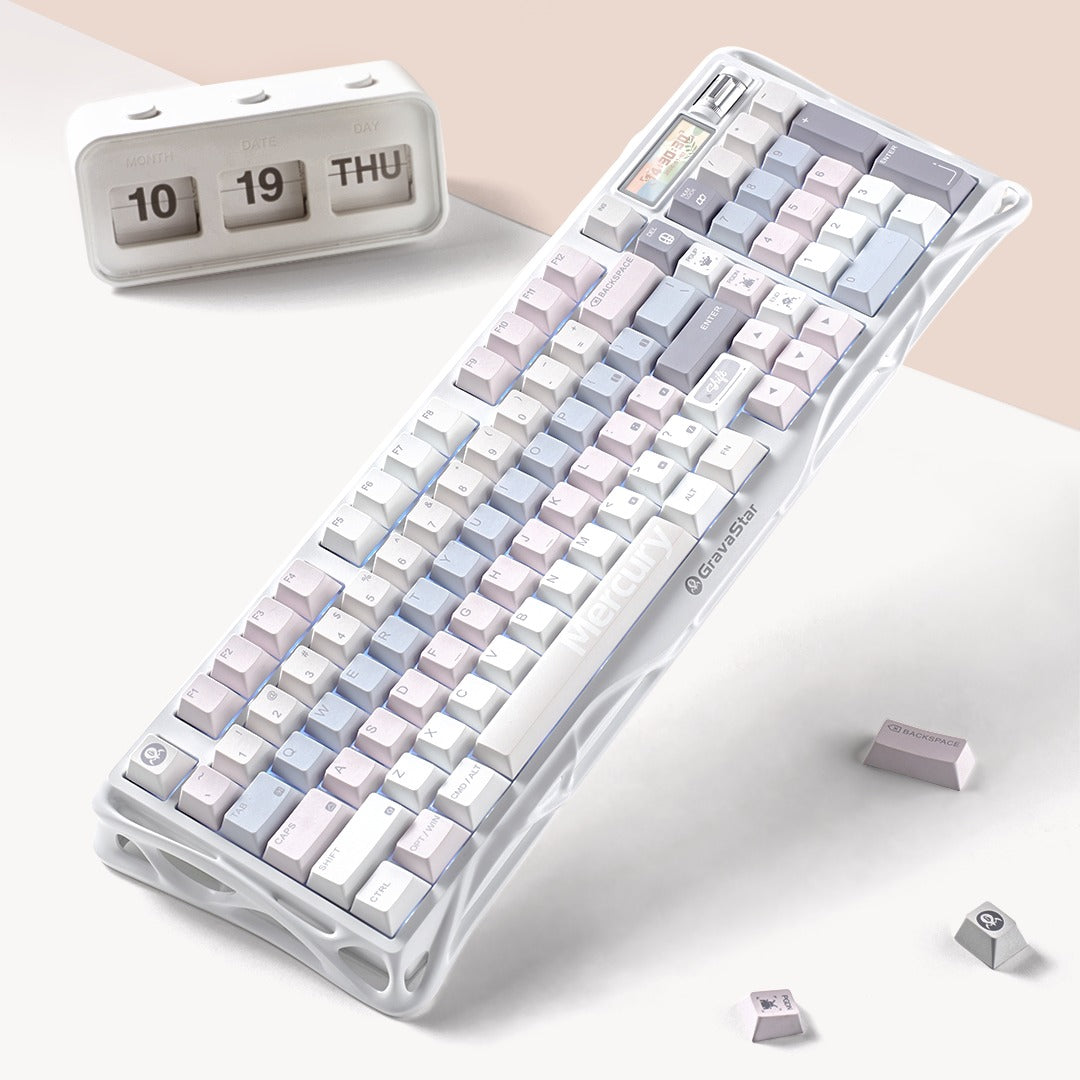
The Mercury V75 Silver Frost brings those features to a 75% layout with a sculpted metallic frame, clear keycaps, and five layers of acoustic foam. The Mercury V60 Ultra offers a compact 60% aluminium body and adds controller mapping for games that use press depth.
Explore the range to choose the layout, feel, and controls you want at your desk.
FAQs
Are Hall Effect keyboards good for typing and gaming?
A Hall Effect keyboard can serve both purposes when its controls suit the way you use each key. You might choose a deeper actuation point for typing to reduce unintended inputs and a shallower point for gaming. The fitted switch still determines its physical feel, so check the design if you prefer a noticeable tactile bump or click.
Do Hall Effect keyboards need special software?
Most can handle basic typing without first changing their settings. To adjust actuation depth, Rapid Trigger, or key mappings, you may need the maker’s app or browser-based tool. Available controls vary by model, and some features may require a firmware update.
Can Hall Effect keyboards work on Mac, Windows, and consoles?
Hall Effect sensing does not determine whether a device accepts standard keyboard input. A keyboard may work for basic typing on one platform even when its configuration tools or game-specific functions have limited support there. Check the product’s stated compatibility for Windows, macOS, Linux, and consoles before relying on advanced features.
Does a higher polling rate make every hall effect keyboard faster?
A higher polling rate shortens the interval between reports sent to a computer, but it describes only one part of the input path. Sensor scanning and controller processing also affect timing, along with the connection and the software receiving the input. A higher advertised rate does not guarantee a noticeable difference in every game or task.
Can magnets in a Hall Effect keyboard damage nearby devices or cards?
The small magnets inside keyboard switches are not a concern for nearby computers, monitors, or solid-state storage during ordinary desk use. Magnetic-stripe cards and older magnetic media deserve more care because exposure to a magnet can affect stored information. Keep those items away from direct contact with the keyboard.

Leave a comment
This site is protected by hCaptcha and the hCaptcha Privacy Policy and Terms of Service apply.